
ThreadHarmonizer Demo
Try ThreadHarmonizer in Your Unity Project
Download the free demo and try the workflow directly inside Unity. Analyze your scripts, review detected files, and experience syntax-aware optimization before committing to the full tool.
If the demo fits your workflow, you can upgrade to the Full Version on the Unity Asset Store and unlock the complete feature set for your projects.
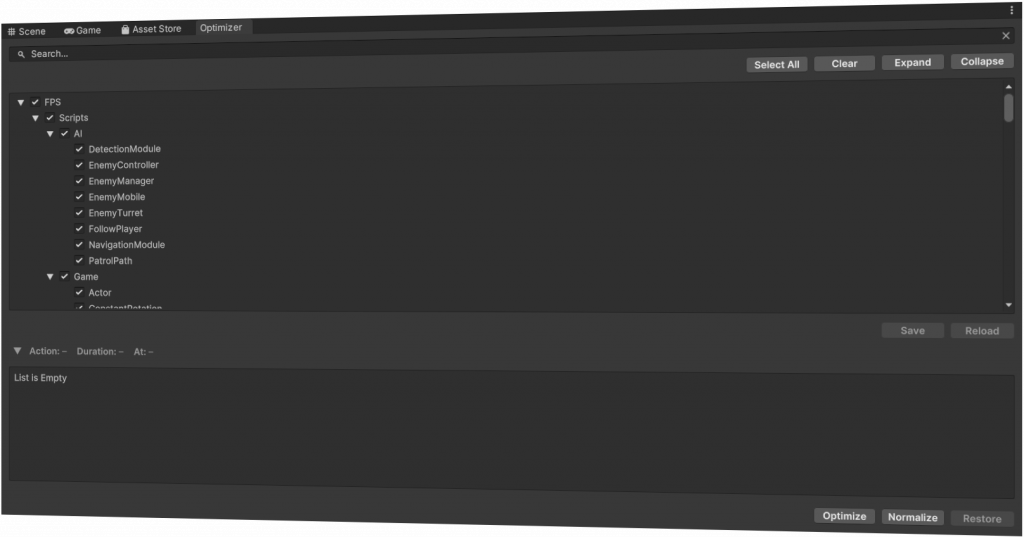
Demo Scope
The demo is focused on testing the workflow and understanding how ThreadHarmonizer handles script analysis and optimization candidates. The demo version lets you test the complete ThreadHarmonizer workflow with only two limitations.
First, the Options window in the toolbar is disabled, so the default settings are applied automatically. Second, the backend multithreading system is limited to 5 minutes after entering Play Mode or starting a built application.
All other core features are available for testing.
The full version unlocks option fine-tuning and removes the timer limitation, allowing you to use ThreadHarmonizer’s multithreading capabilities without restrictions.
ThreadHarmonizer vs. Unity’s Job System
Unity’s Job System is a powerful solution for data-oriented multithreading. ThreadHarmonizer takes a different route: it brings multithreading closer to your existing MonoBehaviour scripts, with less manual restructuring and a workflow that is easier to apply to existing projects.
For equally suitable workloads, both approaches can achieve comparable optimization results when implemented well. The advantage of ThreadHarmonizer is how quickly you can get there. Instead of rebuilding large parts of your code around jobs, ThreadHarmonizer analyzes your scripts, identifies suitable optimization candidates, and applies much of the integration automatically.
This keeps your script logic easier to follow, helps you reach useful results earlier, and saves valuable development time. ThreadHarmonizer can also be used alongside Unity’s Job System, so you can choose the best approach for each part of your project.
If there is enough interest, we plan to expand our automatic integration workflow even further and explore support for Job System-based optimization as well — with the goal of making multithreading in Unity as comfortable and practical as possible.
Ready for the Full Version?
Use the full version of ThreadHarmonizer when you want to apply controlled multithreading optimization across your Unity project and work with the complete feature set.